
Search for the Solution?
Understanding WooCommerce Hosting Requirements
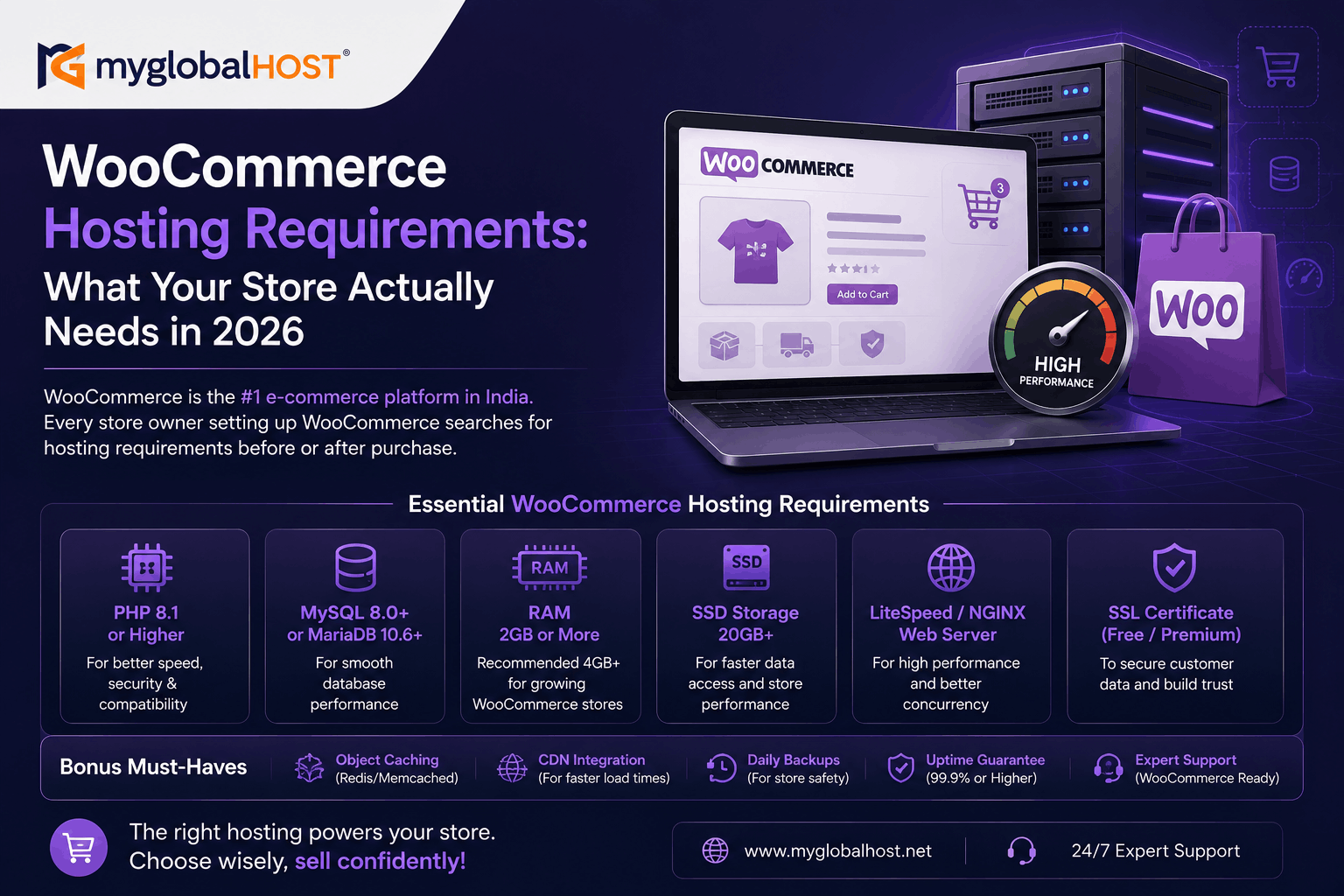
WooCommerce Hosting Requirements: What Your Store Actually Needs in 2026
Introduction: WooCommerce Is Not a Blog — Your Hosting Must Reflect That
WooCommerce is the world’s most popular e-commerce platform. According to BuiltWith data from early 2026, WooCommerce is installed on over 6.6 million live websites globally, holding approximately 36% market share among all e-commerce platforms — far ahead of Shopify (20%), Squarespace Commerce (15%), and Wix Stores (5%). In India, WooCommerce is the default choice for online stores across fashion, electronics, food, handicrafts, digital products, and B2B wholesale.
But WooCommerce is fundamentally different from a blog or a brochure website in one critical way: it is never at rest.
Every page load on a WooCommerce store triggers a cascade of operations that a simple WordPress blog never runs: database queries for product data, variations, and stock levels; cart session management for every visitor; payment API connections; logged-in user personalisation; inventory updates; tax and shipping calculations; and order management. Under concurrent traffic — multiple visitors browsing, adding to cart, and checking out simultaneously — these operations stack rapidly and place genuine demands on your hosting infrastructure.
This is why the question “what hosting do I need for WooCommerce?” cannot be answered with a one-size-fits-all recommendation. It depends on your store’s size, traffic, product complexity, and growth trajectory. This guide answers it with specific requirements, benchmarks, and real-world configuration guidance at each stage.
Part 1: Official WooCommerce Minimum Requirements (2026)
WooCommerce’s official documentation sets the following minimum technical requirements. These are the absolute floor — the configuration below which WooCommerce may not function correctly or securely.
PHP Version
Minimum: PHP 7.4 (end of life — no longer receiving security patches)
Recommended: PHP 8.2 or PHP 8.3
Do not use in 2026: PHP 7.x in any form
PHP 8.2 and 8.3 deliver measurably better performance for WooCommerce stores. Benchmarks from 2026 show PHP 8.3 handles approximately 23% higher throughput on WooCommerce workloads compared to PHP 7.4, with product pages loading approximately 25% faster. This single upgrade — from PHP 7.4 to PHP 8.x — is the highest return-on-investment server change most WooCommerce store owners can make.
On all myglobalHOST hosting plans, PHP version selection is available directly from cPanel using the MultiPHP Manager. You can switch your site to PHP 8.2 or 8.3 in under 60 seconds without any downtime or server restart.
MySQL / MariaDB Version
Official WooCommerce minimum: MySQL 5.7+ or MariaDB 10.4+
Recommended for 2026: MySQL 8.0 or MariaDB 10.6+
Why it matters: MySQL 8.0 delivers significantly improved query performance, better JSON handling (used by WooCommerce’s HPOS — High Performance Order Storage — which was made default in WooCommerce 7.1), and improved indexing for large product catalogs
All myglobalHOST servers run current-generation MySQL/MariaDB versions compatible with WooCommerce’s HPOS and all modern WooCommerce extensions.
WordPress Version
WooCommerce requires: WordPress 6.0 or higher
Recommended: Always the latest stable WordPress release
Keep WordPress updated. Outdated WordPress core is the primary attack vector for WooCommerce stores — and an attacked store means lost customer data, lost revenue, and potential PCI compliance liability.
HTTPS / SSL Certificate
Status: Mandatory — not optional
WooCommerce processes payment data. No payment gateway (Razorpay, PayU, CCAvenue, Stripe, PayPal) will function correctly on an HTTP site in 2026. Chrome and all major browsers display “Not Secure” warnings on HTTP sites, which visibly destroys buyer confidence at the checkout page.
All myglobalHOST plans include free SSL certificates. See: How to Install and Activate SSL in cPanel Hosting
Once SSL is active, force all traffic to HTTPS: Force HTTPS Using .htaccess
Memory Limit (WordPress PHP Memory)
Minimum for small stores: 256MB
Recommended for WooCommerce: 512MB
For large stores with page builders: 1GB+
The WordPress memory limit (WP_MEMORY_LIMIT in wp-config.php) determines how much RAM WordPress can allocate per request. WooCommerce uses more RAM than a standard WordPress blog because of cart session management, product variation loading, and payment API connections. Starving your store of memory results in the white screen of death during high-traffic periods — at exactly the moment it matters most.
To increase WordPress memory limit, add to wp-config.php:
define('WP_MEMORY_LIMIT', '512M');
define('WP_MAX_MEMORY_LIMIT', '512M');
Part 2: Real-World RAM Requirements by Store Size
Official minimum requirements tell you what WooCommerce can technically run on. Real-world requirements tell you what you actually need for reliable performance. These are significantly different for WooCommerce.
Micro Store (Under 50 Products, Under 5,000 Monthly Visitors)
Minimum RAM: 2GB
Recommended: 4GB
Storage: NVMe SSD
Caching: LiteSpeed Cache with correct WooCommerce exclusions
Database: MySQL 8.0 or MariaDB 10.6
This configuration works for a new or very small WooCommerce store receiving low concurrent traffic. On myglobalHOST’s WordPress Hosting starting from ₹54/month, this store size is comfortably supported with LiteSpeed Enterprise and NVMe storage included.
Growing Store (50–500 Products, 5,000–30,000 Monthly Visitors)
Minimum RAM: 4GB
Recommended: 4–8GB
CPU: 2 dedicated cores minimum
Storage: NVMe SSD (mandatory — SATA SSD shows measurable bottleneck at this product count and traffic level)
Caching: LiteSpeed Cache + Redis Object Cache
Database: MySQL 8.0, HPOS enabled
At this stage, WooCommerce’s database becomes the primary performance constraint. Product queries, variation loading, stock checks, and order management generate hundreds of database calls per page. Redis Object Cache reduces these by storing query results in server memory between requests — reducing database calls from 80–150 per uncached page down to 8–25 per page.
The NVMe requirement is real at this stage: WooCommerce’s random I/O profile (many small database reads and writes) is exactly the workload where NVMe’s 5–10x IOPS advantage over SATA SSD translates into measurable TTFB differences. See: What is NVMe SSD Hosting and Why is it Faster Than Regular SSD?
myglobalHOST’s Cloud Hosting starting from ₹156/month includes NVMe storage, dedicated resources, and auto-scaling — the right infrastructure for a growing WooCommerce store.
Established Store (500+ Products, 30,000–100,000 Monthly Visitors)
Minimum RAM: 8GB dedicated
Recommended: 16GB
CPU: 4 dedicated cores minimum
Storage: NVMe SSD — non-negotiable
Caching: LiteSpeed Cache + Redis Object Cache + QUIC.cloud CDN
Database: MySQL 8.0 with HPOS, optimised indexes, query cache
Additional: Dedicated database server consideration
High-traffic WooCommerce stores with large catalogs require dedicated resources. Shared hosting — even quality shared hosting — cannot reliably maintain the consistent TTFB required for checkout conversion at this traffic level. Under concurrent load of 100–200 simultaneous visitors, a shared server’s Entry Process and CPU limits will be reached, causing 503 errors at checkout.
For stores at this level, myglobalHOST’s NVMe VPS or SSD VPS provide dedicated resources with full root access to configure Redis, custom PHP workers, and database optimisation.
Enterprise Store (1,000+ Products, 100,000+ Monthly Visitors, Multi-Currency, B2B)
Architecture: Dedicated VPS or cloud infrastructure with separate database server
RAM: 16–32GB
CPU: 8+ dedicated cores
Storage: NVMe SSD RAID configuration
Caching: Full stack — page cache, object cache, CDN, opcode cache
Additional: Load balancing consideration, dedicated Redis server, Elasticsearch for product search
At enterprise scale, WooCommerce architecture decisions — HPOS, REST API usage, product attribute indexing, custom table optimisation — matter as much as raw hardware. Raise a support ticket with myglobalHOST’s technical team to discuss infrastructure planning for stores at this scale.
Part 3: Storage Type — Why NVMe Is Not Optional for WooCommerce
This is the infrastructure detail that most WooCommerce hosting guides skip entirely, and it is one of the most consequential decisions for store performance.
WooCommerce is fundamentally a database-intensive application. Every product page load queries the database for:
- Product title, description, short description
- Product images (attachment IDs)
- Product price (and sale price if active)
- Product variations and attributes
- Stock quantity and availability
- Related products
- Product reviews and ratings
- WooCommerce meta fields (weight, dimensions, shipping class)
On a store with 200 products and 20 variations per product, a category page can trigger 300–600 individual database reads. These are random small reads — the workload category where NVMe’s advantage over SATA SSD is most dramatic.
Real numbers:
- SATA SSD: ~100,000 random 4K IOPS, 100–200 microsecond latency
- NVMe SSD: ~600,000 random 4K IOPS, 10–20 microsecond latency
For a WooCommerce store under concurrent traffic — 50 simultaneous visitors browsing products — the IOPS demand compounds rapidly. On SATA SSD infrastructure, database query queues begin forming. TTFB climbs. Checkout pages slow. Cart abandonment increases.
On NVMe, those same 600 random reads per page complete 5–10x faster, maintaining sub-200ms TTFB even under concurrent load.
All myglobalHOST Cloud Hosting and VPS plans run on NVMe storage. This is not a premium add-on — it is the standard infrastructure.
Part 4: Web Server — Why LiteSpeed Matters More for WooCommerce Than for Blogs
WooCommerce creates a fundamental performance challenge that simple blogs do not face: the two-audience problem.
- Anonymous visitors (browsing products, viewing categories) can be served cached pages — fast, low resource consumption
- Logged-in users and customers with items in their cart cannot be served standard cached pages — their cart content, pricing, and session data must be dynamically generated
Every WooCommerce store therefore has two distinct performance requirements happening simultaneously, and the web server must handle both efficiently.
Apache handles this reasonably on low traffic but saturates CPU rapidly under concurrent mixed load. Its process-based architecture means 50 simultaneous visitors — half browsing cached pages, half with active carts — can consume significant process memory and CPU.
Nginx handles concurrent connections well but requires PHP-FPM for all dynamic requests, adding inter-process communication overhead on every cart and checkout page load.
LiteSpeed with LSCache is the optimal choice for WooCommerce because:
- LSCache handles the two-audience problem natively — cached pages are served from server memory at static-file speed; uncached pages (cart, checkout, logged-in users) are served through LSAPI’s faster PHP handling
- ESI (Edge Side Includes) allows LiteSpeed to cache most of a page while keeping the cart count widget dynamically updated — eliminating the notorious WooCommerce cart fragments AJAX call that can add 300ms–1.5 seconds to TTFB on every page load
- LSAPI eliminates PHP-FPM overhead on dynamic checkout requests — meaningful latency reduction per transaction
- HTTP/3 native support improves mobile checkout performance — significant for Indian shoppers where mobile accounts for 70%+ of e-commerce traffic
In independent 2026 benchmarks, LiteSpeed handles approximately 40x more concurrent WordPress requests than Apache on identical hardware. For WooCommerce specifically — with its mix of cached product pages and dynamic cart/checkout — LiteSpeed consistently delivers lower TTFB on both audience types simultaneously.
See the full web server comparison: Apache vs LiteSpeed vs Nginx: Which Web Server is Fastest?
Part 5: Configuring LiteSpeed Cache for WooCommerce — The Right Way
LiteSpeed Cache is free, deeply integrated with LiteSpeed’s server engine, and includes WooCommerce-specific settings. But misconfiguration causes the exact problems WooCommerce store owners fear most — customers seeing each other’s cart contents, incorrect prices displayed, or checkout failures.
Here is the correct configuration for a WooCommerce store on myglobalHOST’s LiteSpeed infrastructure.
Step 1 — Enable LiteSpeed Cache
Install and configure LiteSpeed Cache per our complete guide: How to Set Up LiteSpeed Cache in cPanel for WordPress
Step 2 — Verify WooCommerce Exclusions
LiteSpeed Cache automatically detects WooCommerce and excludes the critical pages from full-page caching. However, after every plugin update, verify these exclusions are in place under LiteSpeed Cache → Cache → Excludes.
Pages that MUST be excluded from full-page cache:
/cart/
/checkout/
/my-account/
/my-account/orders/
/my-account/edit-account/
Cookies that MUST trigger cache bypass:
woocommerce_cart_hash
woocommerce_items_in_cart
wp_woocommerce_session_
woocommerce_recently_viewed
wordpress_logged_in_
Query strings that MUST trigger cache bypass:
add-to-cart
wc-ajax
Failure to exclude these correctly results in:
- User A’s cart contents appearing for User B
- Stock levels showing as incorrect after purchases
- Checkout failing for users with active sessions
- My Account pages showing wrong customer data
For a complete guide: Fixing Compatibility Issues Between LiteSpeed Cache and WooCommerce
Step 3 — The Cart Fragments Problem and How to Fix It
By default, WooCommerce fires an AJAX request to wp-admin/admin-ajax.php on every single page load — including fully cached product pages — to check whether the cart count has changed. This single AJAX call can add 300ms to 1.5 seconds to the TTFB of every page on your store, even pages that are otherwise perfectly cached.
The fix depends on your store configuration:
Option A — Disable cart fragments on non-cart pages: Add to your theme’s functions.php:
add_action('wp_enqueue_scripts', function() {
    if (!is_cart() && !is_checkout() && !is_account_page()) {
        wp_dequeue_script('wc-cart-fragments');
    }
});
Option B — Use LiteSpeed Cache ESI (recommended): Enable Edge Side Includes (ESI) in LiteSpeed Cache settings. ESI allows LiteSpeed to cache the main page content while keeping the cart widget dynamic — serving the cart count from a separately cached ESI fragment that updates only when the cart actually changes. This eliminates the cart fragments AJAX call entirely without breaking cart functionality.
ESI is available on myglobalHOST’s LiteSpeed infrastructure and is the technically superior approach for stores where the cart count displays on every page.
Step 4 — Enable Object Caching (Redis)
Object caching stores the results of expensive database queries in server memory (RAM) between requests. Without it, WooCommerce runs the same database queries repeatedly — product price calculations, tax rules, shipping rates, product attribute lookups — on every page load.
With Redis Object Cache:
- Database queries per page drop from 80–150 to 8–25
- TTFB on uncached pages drops by approximately 40–75%
- Product catalog pages with large attribute sets load significantly faster
LiteSpeed Cache includes Redis Object Cache integration. Enable it under LiteSpeed Cache → Cache → Object → Object Cache Method → Redis.
On myglobalHOST Cloud Hosting and VPS plans, Redis is available. Contact support via your Client Dashboard to enable Redis for your account.
Step 5 — Enable PHP OPcache
OPcache caches compiled PHP bytecode in memory, eliminating repeated PHP compilation on every request. For WooCommerce — which loads hundreds of PHP class files per page — OPcache reduces server-side processing time measurably.
Enable OPcache: How to Enable OPcache in cPanel
Step 6 — Configure Image Optimisation
WooCommerce stores are image-heavy — product photos, category banners, brand logos. Unoptimised images are one of the most common causes of poor Largest Contentful Paint (LCP) scores and slow checkout experiences.
LiteSpeed Cache + QUIC.cloud handles this through:
- WebP conversion — serving WebP format images (typically 25–35% smaller than JPEG) to browsers that support it
- Lazy loading (below-fold only) — deferring off-screen images from loading until they scroll into view
- LCP image exclusion — ensuring your above-fold product hero image loads immediately, never lazy-loaded
Never lazy-load your above-fold hero image or featured product image. This directly damages your LCP score and hurts rankings. LiteSpeed Cache’s LCP Image Optimisation setting handles this automatically when enabled.
Part 6: The WooCommerce Caching Rules — What to Cache and What Never to Cache
This is the most misunderstood aspect of WooCommerce performance, and getting it wrong is worse than not caching at all.
| Page Type | Cache? | Why |
|---|---|---|
| Shop / Category pages (anonymous) | ✅ Yes | Static product listings — safe to cache |
| Individual product pages (anonymous) | ✅ Yes | Product data rarely changes mid-session |
| Homepage | ✅ Yes | Mostly static content |
| Blog posts | ✅ Yes | No dynamic WooCommerce data |
| Search results | ⚠️ Caution | Cache only if search terms are static; exclude AJAX search |
Cart (/cart/) |
❌ Never | Contains per-user session data |
Checkout (/checkout/) |
❌ Never | Contains payment data, must be fresh |
My Account (/my-account/) |
❌ Never | Contains personal customer data |
| Order confirmation page | ❌ Never | Order-specific, unique per transaction |
| Logged-in user pages | ❌ Never | All pages bypass cache for logged-in customers |
Pages with ?add-to-cart= query |
❌ Never | Active cart modification |
| WooCommerce AJAX endpoints | ❌ Never | Dynamic cart/checkout operations |
Part 7: WooCommerce Performance Benchmarks — What You Should Actually Achieve
These are realistic TTFB and load time targets for WooCommerce stores on quality hosting infrastructure with correct configuration.
Product Page (Anonymous Visitor, Cached)
| Configuration | TTFB | Load Time |
|---|---|---|
| LiteSpeed + NVMe + LSCache (cache hit) | 50–150ms | 500ms–1.5s |
| LiteSpeed + NVMe + LSCache (cache miss) | 200–400ms | 1–2.5s |
| Apache + SATA SSD (cached) | 200–400ms | 1–3s |
| Apache + SATA SSD (uncached) | 500–1,500ms | 3–6s |
Cart / Checkout Page (Dynamic — Never Cached)
| Configuration | TTFB | Impact on Checkout |
|---|---|---|
| LiteSpeed + NVMe + Redis OC | 100–300ms | Smooth — low abandonment |
| LiteSpeed + NVMe (no Redis) | 300–600ms | Acceptable |
| Apache + SATA SSD | 500–1,500ms+ | High abandonment risk |
| Shared hosting at resource limit | 1,000–4,000ms | Checkout failures, revenue loss |
Research consistently shows that a 100ms reduction in checkout page load time corresponds to approximately 1% increase in WooCommerce conversion rate. For a store doing ₹5 lakh/month in revenue, optimising checkout from 800ms to 200ms TTFB is worth potentially ₹30,000–60,000/month in additional revenue.
This is the business case for quality hosting infrastructure — not a technical nicety.
Part 8: Security Requirements Specific to WooCommerce
WooCommerce stores handle payment data, customer personal information, and order histories. This creates security obligations that go beyond standard WordPress security.
PCI Compliance Basics
WooCommerce stores using payment gateways must meet baseline PCI-DSS requirements. This does not require expensive PCI certification for most Indian stores using gateway-hosted payment pages (Razorpay, PayU, CCAvenue) — because the actual card data never touches your server, it goes directly to the payment gateway. However, your hosting environment must still meet basic standards.
Required Security Measures for WooCommerce Stores
SSL/HTTPS everywhere — mandatory for any payment processing. See: How to Install and Activate SSL in cPanel Hosting
Regular backups — WooCommerce order data is business-critical. Back up daily, store copies offsite. See: How to Take a Full Account Backup in cPanel Manually and How to Backup MySQL Databases with Mysqldump
Server-level firewall — blocks malicious traffic before it reaches WordPress or WooCommerce. See: How to Install CSF Firewall in WHM/cPanel and How to Configure CSF for Maximum Security
Malware scanning — on myglobalHOST’s infrastructure, Imunify360 provides real-time malware scanning and automatic threat blocking. See: Auto Block Attackers with Imunify360 and LiteSpeed WHM
Bad bot blocking — bot traffic consumes server resources and skews your analytics. See: How to Stop Bad Bots in WordPress via Plugin and Stop Bad Bots Using ModSecurity
Limit Login Attempts — WooCommerce admin and customer account pages are targeted by credential stuffing bots. Install Limit Login Attempts Reloaded or use Wordfence’s login protection.
Strong SMTP for transactional email — WooCommerce order confirmations, shipping notifications, and customer account emails must be delivered reliably. PHP mail() is not sufficient. See: WordPress SMTP Setup Guide
Part 9: WooCommerce-Specific Hosting Features to Look For
When evaluating a hosting plan for WooCommerce, these are the features that actually affect store performance — beyond the generic “fast hosting” claims.
Essential
- ✅ LiteSpeed Enterprise web server — not Apache, not generic shared hosting web servers
- ✅ NVMe SSD storage — not SATA SSD, not HDD
- ✅ PHP 8.2 or 8.3 available — with easy version switching in cPanel
- ✅ MySQL 8.0 or MariaDB 10.6 — required for HPOS and modern WooCommerce
- ✅ Free SSL certificate — mandatory for payment processing
- ✅ Minimum 256MB PHP memory limit (512MB recommended, 1GB ideal)
- ✅ Daily backups — with easy one-click restoration
- ✅ 99.9%+ uptime guarantee — downtime is lost revenue for a store
- ✅ cPanel control panel — for managing databases, email, SSL, and PHP settings
Strongly Recommended
- ✅ Redis Object Cache available — critical for cart/checkout performance at scale
- ✅ QUIC.cloud CDN integration — for global static asset delivery
- ✅ LiteSpeed Cache (LSCache) — server-level caching with WooCommerce ESI support
- ✅ HTTP/3 / QUIC support — improves mobile checkout performance
- ✅ Softaculous for WordPress installation — faster initial setup
- ✅ Imunify360 or equivalent malware protection — for store security
For Growing Stores
- ✅ Auto-scaling capability — handles flash sales and traffic spikes without manual intervention
- ✅ Dedicated CPU and RAM — VPS or cloud rather than shared
- ✅ Root/SSH access — for custom server-level optimisation
Part 10: Which myglobalHOST Plan Is Right for Your WooCommerce Store?
Based on the requirements outlined above, here is how myglobalHOST’s plans map to WooCommerce store sizes.
For New and Small WooCommerce Stores
Recommended: WordPress Hosting — from ₹54/month
- LiteSpeed Enterprise web server
- NVMe SSD storage
- Free SSL certificate
- PHP 8.3 available via cPanel MultiPHP Manager
- MySQL/MariaDB current versions
- LiteSpeed Cache (LSCache) included at server level
- Softaculous for one-click WordPress installation
- cPanel for easy management
- Free daily backups
- 99.99% uptime guarantee
- HTTP/3 and QUIC support
Best for: New WooCommerce stores with under 100 products, under 10,000 monthly visitors, single currency, standard payment gateways (Razorpay, PayU, PayPal)
Not suitable for: Stores expecting rapid traffic growth, WooCommerce B2B/wholesale with role-based pricing, or stores with 500+ products at launch
How to start: How to Purchase a Shared Hosting Plan → How to Install WordPress in cPanel Using Softaculous → LiteSpeed Cache Setup Guide
For Growing WooCommerce Stores
Recommended: Cloud Hosting — from ₹156/month
- 100% NVMe storage (no inode restrictions)
- LiteSpeed Enterprise
- Dedicated resources with auto-scaling
- Unlimited email accounts
- WhatsApp Order Notification for WooCommerce (available as addon)
- WhatsApp API Module (available as addon)
- Free premium themes included (Divi Pro, Astra Pro, Extra, ACF Pro, Bookly Pro, WPForms Pro, Ultimate Addons for Elementor)
- Indian Data Centre for lower latency to Indian customers
- Free backups
- 99.99% uptime
Best for: Stores with 100–1,000 products, 10,000–100,000 monthly visitors, seasonal traffic spikes (Diwali sales, Big Billion Day-scale campaigns), WooCommerce Subscriptions, WooCommerce Memberships, or multi-currency stores
The auto-scaling advantage for Indian e-commerce: Flash sales, festival season traffic spikes, and influencer-driven traffic surges are the norm for Indian online stores. Cloud Hosting auto-scales to handle these events without manual intervention — no 503 errors during your biggest sales days.
For High-Traffic and Custom WooCommerce Stores
Recommended: NVMe VPS or SSD VPS
- Dedicated CPU cores and RAM — no shared resource contention
- Dedicated NVMe storage — maximum IOPS for large product catalogs
- Root SSH access for Redis configuration, custom PHP workers, database tuning
- Available in India, USA, Europe, and Singapore data centres
- Full control over server environment — custom caching stacks, Elasticsearch for product search, custom PHP-FPM pool configuration
Best for: Stores doing 100,000+ monthly visitors, enterprise B2B WooCommerce, multi-site WooCommerce networks, stores with custom development requirements, or agency-managed high-traffic client stores
For Resellers and Agencies Managing Multiple WooCommerce Clients
Recommended: Reseller Hosting
Manage multiple client WooCommerce stores under individual, isolated cPanel accounts through WHM. Each client store gets its own resource allocation, database, SSL, and security environment — preventing one client’s traffic spike from affecting another’s checkout performance.
WooCommerce Hosting Requirements Summary Table
| Requirement | Minimum | Recommended | On myglobalHOST |
|---|---|---|---|
| PHP Version | 7.4 (EOL) | 8.2 or 8.3 | ✅ 8.3 available |
| MySQL | 5.7 | 8.0 | ✅ Current version |
| WordPress Version | 6.0 | Latest | ✅ Via Softaculous |
| SSL Certificate | Required | Required | ✅ Free included |
| PHP Memory Limit | 256MB | 512MB+ | ✅ Configurable |
| Web Server | Apache/Nginx | LiteSpeed | ✅ LiteSpeed Enterprise |
| Storage | SSD | NVMe SSD | ✅ NVMe on all plans |
| Caching | Basic | LSCache + Redis | ✅ LSCache included |
| HTTP Protocol | HTTP/2 | HTTP/3 | ✅ Native HTTP/3 |
| Uptime | 99.9% | 99.99% | ✅ 99.99% guaranteed |
| Daily Backups | Recommended | Essential | ✅ Included |
Post-Installation Checklist for a New WooCommerce Store on myglobalHOST
Use this checklist after setting up your WooCommerce store to verify every hosting requirement is correctly configured:
Server Configuration
- ✅ PHP version set to 8.2 or 8.3 in cPanel MultiPHP Manager
- ✅ MySQL version confirmed as 8.0 or MariaDB 10.6+ (visible in phpMyAdmin)
- ✅ SSL installed and HTTPS forced across all pages
- ✅ WordPress memory limit set to minimum 512MB in wp-config.php
- ✅ OPcache enabled via cPanel — guide here
WooCommerce Cache Configuration
- ✅ LiteSpeed Cache installed and server-level cache enabled via cPanel LiteSpeed Web Cache Manager
- ✅ Cart, Checkout, My Account pages confirmed excluded from full-page cache
- ✅ WooCommerce session cookies added to cache bypass rules
- ✅ Cart fragments AJAX issue addressed (ESI or conditional dequeue)
- ✅ Redis Object Cache enabled and confirmed connected (if available on plan)
Performance
- ✅ All product images optimised via QUIC.cloud (WebP conversion active)
- ✅ Lazy loading active for below-fold images; LCP image excluded from lazy loading
- ✅ JS and CSS minification enabled and tested — no broken layouts
- ✅ QUIC.cloud CDN connected for static asset delivery
Security
- ✅ SSL installed and HTTPS forced — guide here
- ✅ Limit Login Attempts plugin active
- ✅ Malware scanning active (Imunify360 on myglobalHOST servers)
- ✅ Server-level firewall (CSF) configured
- ✅ Daily backups confirmed active and tested
Email and Communication
- ✅ WooCommerce transactional email tested (order confirmation, shipping notification)
- ✅ SMTP configured for reliable email delivery — guide here
- ✅ Professional domain email created for store communications
Verification
- ✅ Google PageSpeed Insights tested — LCP under 2.5s, TTFB under 800ms
- ✅ Test purchase completed on live store
- ✅ Cart count updates correctly after adding product
- ✅ Checkout process completes without errors
- ✅ Order confirmation email received by test customer
Related Knowledge Base Articles
WooCommerce Setup and Configuration
- How to Install WordPress in cPanel Using Softaculous
- Fixing Compatibility Issues Between LiteSpeed Cache and WooCommerce
- How to Set Up LiteSpeed Cache in cPanel for WordPress
- How to Enable OPcache in cPanel
- WordPress SMTP Setup Guide
SSL and HTTPS
- How to Install and Activate SSL in cPanel Hosting
- Force HTTPS Using .htaccess
- Force WWW in Your .htaccess File in cPanel
Performance and Infrastructure
- What is NVMe SSD Hosting and Why is it Faster Than Regular SSD?
- Apache vs LiteSpeed vs Nginx: Which Web Server is Fastest?
- Shared Hosting vs VPS Hosting: Which One Do You Actually Need?
- Does WP Rocket Hurt SEO? What WordPress Users Need to Know
Security
- How to Install CSF Firewall in WHM/cPanel
- How to Configure CSF in WHM/cPanel for Maximum Security
- Auto Block Attackers with Imunify360 and LiteSpeed WHM
- How to Stop Bad Bots in WordPress via Plugin
- Stop Bad Bots Using ModSecurity
Backups and Database
- How to Take a Full Account Backup in cPanel Manually
- How to Backup MySQL Databases with Mysqldump
- Repair and Optimise MySQL Database on cPanel/WHM Server
Account Management
- How to Upgrade a Hosting Plan
- How to Purchase a Shared Hosting Plan
- How to Purchase a Cloud Hosting Plan
- How to Open a Ticket at myglobalHOST
- What Are the Support Timings?
- WordPress Hosting in India — The Ultimate Guide
Choose Your WooCommerce Hosting Plan
| Plan | Starting Price | NVMe | LiteSpeed | Auto-Scale | Best For |
|---|---|---|---|---|---|
| WordPress Hosting | ₹54/month | ✅ Yes | ✅ Enterprise | ❌ No | New stores, under 10K visitors/month |
| Unlimited Hosting | Competitive | ✅ Yes | ✅ Enterprise | ❌ No | Multiple small WooCommerce stores |
| Cloud Hosting | ₹156/month | ✅ Yes | ✅ Enterprise | ✅ Yes | Growing stores, seasonal spikes |
| SSD VPS | VPS pricing | SSD | ✅ Configurable | Manual | High-traffic, custom requirements |
| NVMe VPS | VPS pricing | ✅ NVMe | ✅ Configurable | Manual | Maximum performance, enterprise |
| Reseller Hosting | Competitive | ✅ Yes | ✅ Enterprise | ❌ No | Agencies managing client stores |
Have a question about which plan is right for your WooCommerce store? Raise a support ticket through your Client Dashboard and our team will review your store requirements and provide a direct recommendation.
This article is part of the myglobalHOST Knowledge Base — technical guides on WooCommerce, WordPress, cPanel, and hosting infrastructure written specifically for Indian website owners.


