
Search for the Solution?
cPanel vs hPanel: Which is Better for Indian Users in 2026?
cPanel vs hPanel: Which is Better for Indian Users in 2026?
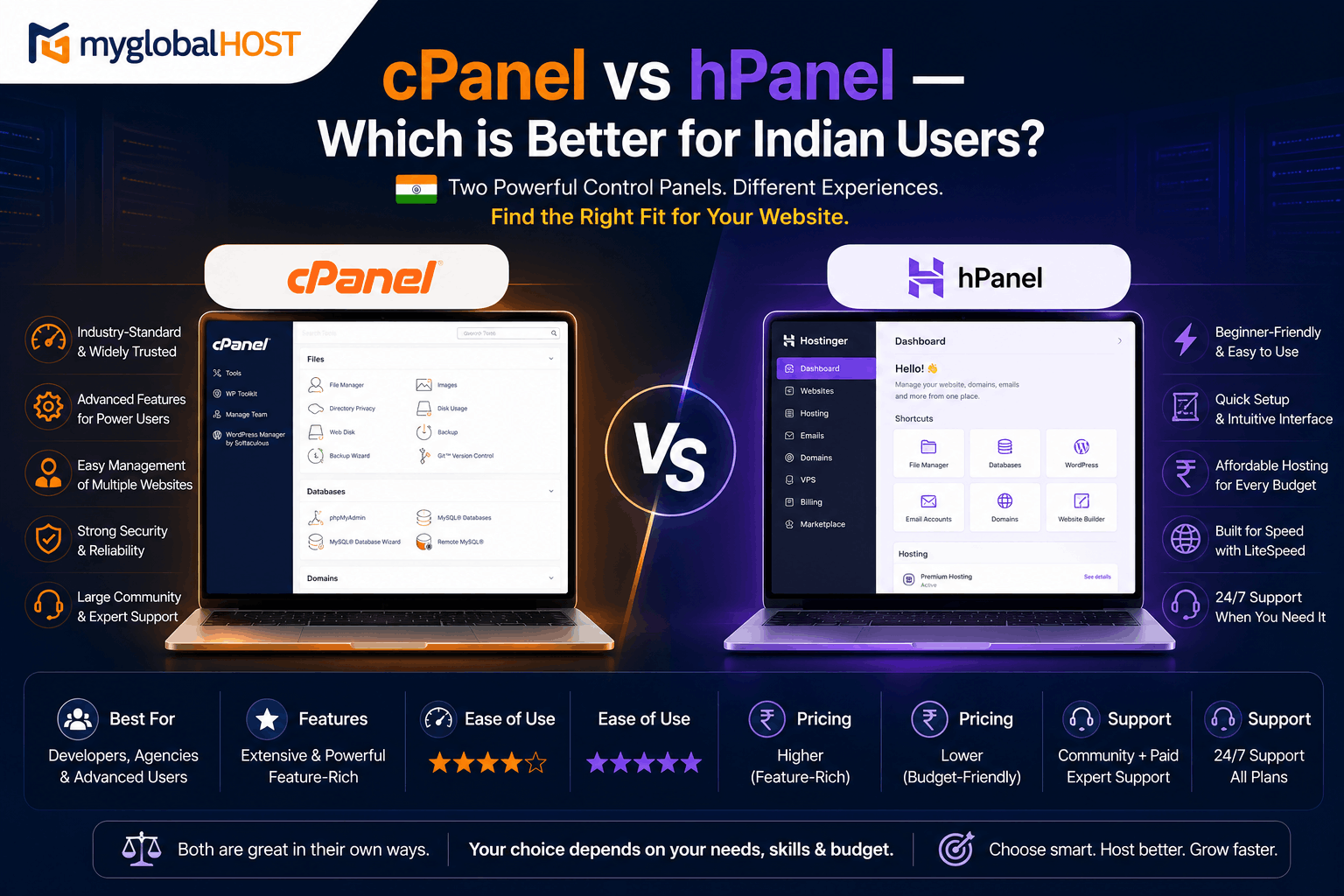
The Control Panel Decision Nobody Warns You About Before You Sign Up
Every hosting plan comes with a control panel — the web interface through which you manage your website files, databases, email accounts, SSL certificates, DNS records, and everything else connected to your hosting account.
Most Indian buyers glance at the feature list, compare prices, and click Buy Now without thinking once about the control panel. This is understandable. It is also one of the most consequential oversights in the hosting purchase journey.
Your control panel determines:
- How easy or difficult it is to learn and manage your hosting
- What tools and software are compatible with your account
- How freely you can migrate to a different hosting provider in future
- Whether you can manage multiple client accounts professionally
- How much documentation and community support exists for every problem you encounter
Two control panels dominate Indian web hosting in 2026: cPanel — the 27-year-old industry standard used by millions of hosting providers worldwide — and hPanel — Hostinger’s proprietary control panel used exclusively on Hostinger’s own plans.
According to current market data, cPanel is 1.3 times more popular than hPanel globally — and notably, hPanel is more popular specifically in India, Brazil, and Indonesia, which directly correlates with Hostinger’s aggressive pricing and marketing in emerging markets. This makes India one of the most contested markets for this control panel choice, and the decision has real consequences that affiliate review sites almost never address honestly.
This guide gives you the complete picture — the genuine strengths of both, the real limitations of both, and a clear, honest recommendation for each type of Indian user.
What Each Control Panel Is — Starting From Zero
cPanel: The Industry Standard Since 1997
cPanel is a Linux-based hosting control panel first released in 1997. For over two decades it has been the default control panel for the majority of web hosting providers worldwide. It is developed and maintained by cPanel LLC (now part of Newfold Digital), updated regularly, and licensed to hosting providers.
When you log into cPanel, you see a dashboard — typically in the “Jupiter” theme in 2026 — with categorised sections: Files, Databases, Domains, Email, Security, Software, Advanced. Each section contains tools to manage that aspect of your hosting account. All tools are visible on one screen with short descriptions, making it discoverable even for users who are exploring it for the first time.
cPanel is paired with WHM (Web Host Manager) on reseller and server-level plans. WHM is the administrator-level interface above cPanel — it allows server administrators and resellers to create and manage multiple cPanel accounts, configure server resources, manage LiteSpeed Cache across all accounts, and operate a multi-tenant hosting environment.
Every myglobalHOST plan — from Web Hosting at ₹54/month to Reseller Hosting — uses full cPanel and WHM.
hPanel: Hostinger’s Proprietary Control Panel
hPanel is a web-based control panel built entirely in-house by Hostinger. It is available only on Hostinger’s hosting plans — you cannot use hPanel anywhere else, and Hostinger cannot use cPanel (it has chosen hPanel as its exclusive interface to avoid cPanel licensing costs).
Hostinger describes hPanel as cloud-based with high availability — each server only exposes API endpoints that connect to the front-end of hPanel, meaning the panel does not consume server resources the way cPanel does when fully hosted on each individual server. Hostinger argues this architecture means there is no performance loss from panel overhead and allows more accounts on a single server, reducing fixed costs.
hPanel’s interface is clean, modern, and designed to be beginner-friendly. Navigation uses a left sidebar with logical groupings — Hosting, Domains, Emails, Files, Databases. It integrates billing, plan management, and support contact directly into the panel — things you would normally access through a separate billing portal on cPanel hosts.
hPanel’s key limitation is its proprietary nature. Because Hostinger built hPanel themselves, it works seamlessly with their systems — but as a result, cPanel’s extensive third-party documentation, community forums, plugin ecosystem, and migration tooling do not apply to hPanel.
Part 1: Interface and Ease of Use
hPanel: Genuinely Easier for Complete Beginners
hPanel wins the interface comparison for one specific type of user: someone who has never managed web hosting before and wants to get a single WordPress site online as quickly as possible.
The left sidebar layout is modern and intuitive. Related features are grouped logically. The homepage shows your active websites at a glance. Billing and plan upgrades are accessible without switching to a separate client portal.
One experienced cPanel user who reviewed hPanel described feeling the difference immediately on login — the interface is clean, modern, and remarkably fast, with a straightforward menu that makes sense to navigate. They noted that while they consider themselves a cPanel fan, hPanel delivers an experience that does not create confusion and is not visually straining.
For a first-time website owner who will manage one WordPress site, this simplicity is genuinely valuable.
cPanel: More Powerful, Requires Slight Learning Curve
cPanel’s interface — particularly in the Jupiter theme — presents all tools on a single screen, organised into sections with descriptive labels. For someone new to hosting, the volume of options can feel overwhelming initially. There is a WordPress Manager, an Email Accounts section, a Databases section, a File Manager — and dozens of other tools, many of which beginners will never use.
However, this apparent complexity is actually cPanel’s strength for intermediate and experienced users. Everything is visible. You do not need to know a feature exists before finding it — you can scan the dashboard and discover capabilities. Third-party tutorials and documentation reference cPanel sections by name, making it trivial to follow guides for setting up SSL, configuring DNS, creating email accounts, or managing databases.
Community forums consistently confirm: users who started on hPanel and liked the interface initially found cPanel more complete after switching — and as someone managing client websites, cPanel provides more control and works with almost every host, backed by extensive documentation and community support.
Verdict: hPanel wins for absolute beginners. cPanel wins for everyone who plans to stay in hosting for more than a few months, manage more than one site, or learn the technical fundamentals of web hosting.
Part 2: Features and Functionality
What Both Panels Include
Both cPanel and hPanel provide the essential hosting management features:
- File Manager for uploading and managing website files
- FTP access
- MySQL database creation and management
- phpMyAdmin for database administration
- DNS Zone management
- Email account creation and management
- SSL certificate installation
- One-click WordPress installation
For basic website management, both panels are functionally adequate.
Where cPanel Has a Clear Feature Advantage
MultiPHP Manager cPanel’s MultiPHP Manager allows you to select a different PHP version for each domain on your account — switching between PHP 7.4, 8.1, 8.2, and 8.3 per website from a graphical interface in seconds. This is essential for developers managing multiple sites that require different PHP versions, or for staging sites testing PHP upgrades before applying them to production.
LiteSpeed Web Cache Manager On myglobalHOST’s LiteSpeed infrastructure, cPanel includes a dedicated LiteSpeed Web Cache Manager — a native interface for enabling, disabling, configuring, and managing server-level LSCache per website. This is a tool that exists only because of cPanel’s deep integration with LiteSpeed Enterprise. See: How to Set Up LiteSpeed Cache in cPanel for WordPress
Softaculous Auto-Installer cPanel’s Softaculous provides one-click installation for WordPress and 400+ other applications — Joomla, Drupal, Magento, PrestaShop, Laravel, Laravel Breeze, and more. It also provides a staging/clone feature that creates complete copies of WordPress installations for testing. See: How to Install WordPress in cPanel Using Softaculous
SSH Access and Advanced Tools cPanel provides direct SSH terminal access (on supported plans), Git Version Control, Cron Jobs management, .htaccess management through File Manager, and full access to PHP configuration (php.ini) per domain. These are tools that professional developers and advanced users rely on daily.
WHM (Web Host Manager) This is where cPanel has an absolute, uncontested advantage over hPanel for resellers and agencies. WHM allows you to:
- Create and manage unlimited separate cPanel accounts for individual clients
- Set resource limits per account (CPU, RAM, Entry Processes, disk space)
- Configure custom nameservers for white-label hosting
- Manage LiteSpeed Cache across all client accounts simultaneously
- Run a fully professional web hosting business under your own brand
hPanel has no equivalent of WHM. Hostinger’s Agency plan allows managing multiple sites from one dashboard, but does not provide per-client account isolation, custom nameservers, or the server-level administration capabilities that WHM offers.
For Indian web designers and digital agencies, this is the single most commercially important difference between the two control panels. Full guide: How Many Websites Can You Host on One Shared Hosting Plan?
cPanel-Specific Security Tools
- Imunify360 integration — real-time malware scanning visible in cPanel
- ModSecurity — Web Application Firewall configurable per account
- IP Blocker — block specific IPs from accessing your hosting account
- Leech Protection — prevents hotlinking of protected resources
- SSH Key Manager — manage SSH key pairs for secure programmatic access
What hPanel Does Better
Integrated Billing and Plan Management hPanel integrates billing, plan upgrades, and support ticket submission directly into the same interface as hosting management. On cPanel-based hosts, these functions typically live in a separate client portal (such as WHMCS). For users who prefer a single interface for everything, this integration is genuinely convenient.
Kodee AI Assistant Hostinger’s hPanel includes Kodee — an AI assistant integrated into the control panel that supports 50+ languages, executes 350+ automated tasks, and can troubleshoot common hosting problems. For completely non-technical users who need guidance within the panel itself, this is a meaningful ease-of-use feature.
AI Website Builder Integration hPanel integrates Hostinger’s drag-and-drop and AI-powered website builders directly into the panel. For users who want to build a site from within their hosting control panel without installing WordPress, this removes a step.
Part 3: The Migration Reality — The Most Important Factor You Are Not Considering
This is the section that Hostinger’s marketing materials will never show you, and the reason every experienced hosting professional recommends cPanel for any website you intend to keep long-term.
cPanel to cPanel Migration: One Click, Complete Restoration
When you want to move a website from one cPanel host to another, the process is:
- In cPanel, go to Files → Backup → Download a Full Account Backup
- The backup creates a standardised
.tar.gzfile containing every file, database, email account, cron job, and configuration associated with your account - Upload this file to your new cPanel host’s WHM or shared hosting migration tool
- The new host restores the complete account — all files, all databases, all email accounts, all DNS zones — exactly as they were on the previous host
This standardised backup format works on any cPanel host worldwide. The entire migration can take under 30 minutes for a typical WordPress site, and under 2 hours for a complex multi-site account. You never need to manually recreate database connections, email accounts, or DNS records.
Full backup guide: How to Take a Full Account Backup in cPanel Manually
cPanel-to-cPanel migrations are so clean precisely because the backup format is standardised — WHM’s Restore function recreates the entire cPanel account on the new server including all files, databases, email accounts, cron jobs, and settings.
hPanel Migration: A Manual, Multi-Step Process
When you want to move a website from Hostinger’s hPanel to any other hosting provider, the situation is fundamentally different.
Hostinger’s own support documentation for migrating from hPanel to cPanel states: download the backup from hPanel, extract the files from the backup, manually upload website files to the correct directories on the new host, separately export the database via phpMyAdmin and import it on the new host, manually recreate email accounts, and separately update domain DNS settings.
This is not a one-click restoration. It is a manual, multi-step process that requires:
- Manually locating files within the hPanel backup archive (which does not use cPanel’s structure)
- Manually importing each database via phpMyAdmin on the destination host
- Manually recreating every email account
- Manually reconfiguring DNS records
- Manually updating database connection strings in wp-config.php if database names differ
For a single simple WordPress blog, this might take 1–2 hours with careful attention. For a WooCommerce store with multiple custom tables, email accounts, and complex DNS configuration, this can take significantly longer and introduces multiple points where errors can cause data loss or downtime.
The practical implication: Every year you stay on Hostinger’s hPanel, your website becomes more entrenched in a proprietary system. Your email history, your database structure, your configuration — all of it accumulates in a format that requires manual work to move. The long-term switching cost grows with every year of usage.
With cPanel, your data is always in a portable, standardised format. Leaving any cPanel host — including myglobalHOST — takes under an hour and leaves nothing behind.
Part 4: Third-Party Compatibility and Ecosystem
cPanel: The Universal Standard
Because cPanel has been the hosting industry standard for over two decades, the entire web hosting ecosystem is built around it:
- Every web hosting tutorial on the internet references cPanel. When you search “how to create a MySQL database for WordPress,” “how to set up email on hosting,” or “how to fix 404 errors on WordPress” — the answer will reference cPanel steps. Following these guides on your myglobalHOST account requires zero translation.
- Server management tools — backup services, monitoring tools, security scanners, developer deployment tools (DeployHQ, Forge, Envoyer) — integrate with cPanel’s APIs
- Migration plugins — Duplicator, All-in-One WP Migration, WPvivid — are designed and tested against cPanel’s file structure
- WordPress staging plugins — InstaWP, WP Staging, Duplicator Pro — work natively with cPanel’s file management
- Third-party SSL management tools — integrate with cPanel’s SSL/TLS Manager API
- Hosting automation platforms — WHMCS, Blesta — are built around cPanel and WHM
hPanel: A Closed Ecosystem
hPanel’s proprietary architecture means third-party integrations are limited to what Hostinger has built or specifically chosen to support:
- Third-party deployment and server management tools that integrate with cPanel APIs do not work with hPanel
- Migration tools built for cPanel need translation — the file and database structure in hPanel backups differs from cPanel’s standard format
- Documentation from any non-Hostinger source that references cPanel steps requires manual interpretation to apply in hPanel
- If Hostinger changes its hPanel interface (which it does regularly as a proprietary product), all external documentation becomes outdated simultaneously
This closed ecosystem is not a temporary limitation — it is a structural consequence of building a proprietary system rather than adopting an industry standard.
Part 5: Cost Transparency — The cPanel Pricing Misconception
A common argument against cPanel-based hosting is that it is “more expensive” because hosting providers pay cPanel licence fees that are passed on to customers.
This argument deserves scrutiny.
The cPanel licence argument: cPanel charges hosting providers a per-account monthly fee. Providers with many accounts pay more. This is a real cost, but it is also:
- Built into the hosting plan price — customers are not separately billed for cPanel
- Offset by the performance and support advantages of using enterprise-grade server management software with decades of hardening
- Comparable to or lower than the Hostinger premium on an honest 3-year cost comparison
The honest 3-year cost comparison:
Hostinger’s promotional pricing is significantly lower than renewal pricing. As confirmed from their live pricing page:
- Single plan: ₹69/mo promotional → ₹289/mo renewal (4x increase)
- Premium plan: ₹149/mo promotional → ₹449/mo renewal (3x increase)
- Business plan (first NVMe tier): ₹249/mo promotional → ₹649/mo renewal (2.6x increase)
myglobalHOST’s cPanel pricing is transparent and stable — the 3-year price is the ongoing price, without a renewal trap.
The hPanel “cheaper” argument is valid for Year 1 only. Over a 3-year period, cPanel-based hosting from myglobalHOST is significantly more affordable than Hostinger’s hPanel plans when renewal pricing is factored in. Full price comparison: myglobalHOST vs Hostinger India 2026
Part 6: LiteSpeed Cache — Only Works Fully on cPanel
This is the technical capability that makes the cPanel vs hPanel comparison particularly stark for Indian WordPress and WooCommerce users.
LiteSpeed Cache (LSCache) — the server-level full-page cache engine built into LiteSpeed Web Server — integrates with cPanel through the LiteSpeed Web Cache Manager. This is a native cPanel module that allows:
- Per-account server-level cache management
- Cache enable/disable from cPanel panel
- Cache root configuration
- WHM-level bulk cache management across all reseller accounts
On hPanel, LiteSpeed Cache operates through the WordPress plugin only. While the plugin is functional, the deep server-level integration — including per-domain cache root configuration, WHM bulk management, and native cPanel cache purge integration — is specific to the LiteSpeed Enterprise + cPanel combination.
For the complete LiteSpeed Cache setup guide on myglobalHOST’s cPanel infrastructure: How to Set Up LiteSpeed Cache in cPanel for WordPress
For why this matters for website performance: LiteSpeed cPanel Hosting India: Why It Matters
Part 7: The Indian Developer and Agency Reality
The most important audience for this comparison in India is not the first-time website owner — it is the developer, freelancer, and agency building and managing websites for clients.
India has a large and growing ecosystem of web professionals: freelancers on Upwork and Fiverr, boutique digital agencies, WordPress development shops, and individual developers managing 10–50 client websites. For this audience, the cPanel vs hPanel comparison is not close.
Why Indian developers and agencies choose cPanel:
- Every client who asks for their own login gets a cPanel they can manage. Your client’s IT team, virtual assistant, or in-house marketing person can find tutorials for literally any cPanel task with a single Google search.
- Moving a client’s website to a new host is a one-click operation. When a client’s business grows and needs a VPS, or when a client wants to host with their own provider, downloading a cPanel backup and restoring it takes 30 minutes. Moving from hPanel takes a day.
- WHM on myglobalHOST’s Reseller Hosting gives you a real hosting business. Custom nameservers, white-label branding, isolated per-client accounts, individual resource limits, bulk security management. This is what separates a professional hosting operation from “I put everyone on my shared account.”
- SSH, Git, and Cron Jobs in cPanel. Modern WordPress development uses Git for version control, SSH for server access, and Cron Jobs for scheduled tasks. cPanel’s native tools for all three are well-documented and widely used. hPanel’s equivalents are more limited and proprietary.
- Documentation that never goes stale. When cPanel updates its interface, tutorials written in 2019 still mostly apply because the underlying structure is consistent. When Hostinger updates hPanel, any non-Hostinger documentation becomes outdated immediately because hPanel is a moving proprietary target.
Part 8: Security Management
cPanel Security Tools
cPanel provides a comprehensive security toolkit accessible from the hosting account:
- SSL/TLS Manager — install, manage, and renew SSL certificates including Let’s Encrypt automation
- Hotlink Protection — prevent other sites from embedding your images
- IP Blocker — block specific IP addresses from your hosting account
- ModSecurity — WAF rule management per account
- Leech Protection — prevent password sharing on protected areas
- Two-Factor Authentication for cPanel login
On myglobalHOST’s server infrastructure, cPanel is complemented by server-level security tools:
- Imunify360 for real-time malware scanning — Auto Block Attackers with Imunify360 and LiteSpeed WHM
- CSF Firewall for connection management — How to Install CSF Firewall in WHM/cPanel
- CloudLinux CageFS for per-account filesystem isolation — CloudLinux Site Isolation in cPanel/WHM
- ModSecurity rules for bad bot blocking — Stop Bad Bots Using ModSecurity
hPanel Security Tools
hPanel includes BitNinja security (on some Hostinger plans), automated malware scanning, and SSL management. For basic security management, these tools are adequate for most beginner users.
The key difference: cPanel’s security tools integrate with server-level configurations (ModSecurity, Imunify360, CSF) that provide defence-in-depth at the web server, filesystem, and firewall layers simultaneously. hPanel’s security tools are primarily application-layer.
The Complete Feature Comparison Table
| Feature | cPanel (myglobalHOST) | hPanel (Hostinger) |
|---|---|---|
| Type | Industry standard (since 1997) | Proprietary (Hostinger only) |
| Interface Complexity | Moderate — all tools visible | Simple — beginner-friendly |
| Learning Curve | Low for intermediate users | Very low for beginners |
| External Documentation | Extensive — millions of guides | Limited — Hostinger only |
| Migration Out | ✅ One-click standard backup | ❌ Manual multi-step process |
| Migration In | ✅ Any cPanel backup restores | ❌ Only Hostinger-format backups |
| WHM Reseller Hosting | ✅ Full WHM included | ❌ Not available |
| Custom Nameservers | ✅ Yes (Reseller) | ❌ Limited |
| White-Label Hosting | ✅ Yes | ❌ No |
| PHP Version per Domain | ✅ MultiPHP Manager | Partial |
| SSH Access | ✅ Yes | Limited |
| Git Version Control | ✅ Native in cPanel | ❌ Not available |
| LiteSpeed Web Cache Manager | ✅ Native integration | ❌ Plugin only |
| Softaculous (400+ apps) | ✅ Yes | WordPress-focused only |
| ModSecurity (WAF) | ✅ Per-account access | Limited |
| Cron Jobs (visual) | ✅ Full Cron Jobs manager | Basic |
| Third-party Tool Integration | ✅ Universal ecosystem | ❌ Proprietary only |
| AI Assistant | ❌ Not built-in | ✅ Kodee (50+ languages) |
| AI Website Builder | ❌ Not built-in | ✅ Hostinger builder |
| Billing Integration | Separate client portal | ✅ Integrated |
| Available On | Thousands of hosts worldwide | Hostinger only |
| Pricing Stability (3-year) | ✅ Stable (myglobalHOST) | ❌ 2.6–4x renewal increase |
The Verdict: Who Should Choose Which
Choose hPanel (Hostinger) If:
- You are building your first website ever and want the absolute simplest interface
- You will only manage a single WordPress site indefinitely
- You value having billing and hosting in one interface
- You want AI assistant guidance within your control panel
- You are confident you will stay on Hostinger long-term and will never need to migrate
Choose cPanel (myglobalHOST) If:
- You are a developer, freelancer, or agency managing client websites
- You will ever need to migrate your website to a different host
- You want to run reseller hosting with proper per-client account isolation
- You manage multiple sites that need different PHP versions
- You want SSH access, Git version control, and advanced server tools
- You want to follow any web hosting tutorial on the internet without translating it for a proprietary interface
- You want LiteSpeed Cache’s full server-level integration with native cPanel management
- You are calculating 3-year total cost honestly — myglobalHOST cPanel is significantly cheaper over a 3-year period
- You want WhatsApp support in Hindi — available at +91-79862-84663 on myglobalHOST
For the vast majority of Indian website owners — including intermediate beginners, bloggers growing their traffic, WooCommerce store owners, and anyone who might ever change hosting providers — cPanel is the right choice. hPanel’s advantage is real but narrow: it serves first-time users who will stay on one platform indefinitely. Everyone else benefits from cPanel’s portability, ecosystem, and professional capabilities.
Getting Started with cPanel Hosting on myglobalHOST
All myglobalHOST plans include full cPanel. Here is your quick-start path:
- Choose your plan: Web Hosting from ₹54/mo | WordPress Hosting | Cloud Hosting from ₹156/mo | Reseller Hosting
- Log in to cPanel: How to Login to cPanel at myglobalHOST
- Install WordPress: How to Install WordPress in cPanel Using Softaculous
- Enable LiteSpeed Cache: How to Set Up LiteSpeed Cache in cPanel for WordPress
- Activate SSL: How to Install and Activate SSL in cPanel Hosting
- Set up your domain email: How to Create an Email Account in cPanel
- Take a backup: How to Take a Full Account Backup in cPanel Manually
Questions? WhatsApp us directly at +91-79862-84663 or raise a ticket through your Client Dashboard.
Related Knowledge Base Articles
- myglobalHOST vs Hostinger India 2026: Which is Actually Better?
- LiteSpeed cPanel Hosting India: Why It Matters
- Apache vs LiteSpeed vs Nginx: Which Web Server is Fastest?
- What is NVMe SSD Hosting and Why is it Faster Than Regular SSD?
- Shared Hosting vs VPS Hosting: Which One Do You Actually Need?
- How Many Websites Can You Host on One Shared Hosting Plan?
- How to Set Up LiteSpeed Cache in cPanel for WordPress
- How to Install WordPress in cPanel Using Softaculous
- How to Login to cPanel at myglobalHOST
- How to Install and Activate SSL in cPanel Hosting
- How to Create an Email Account in cPanel
- How to Take a Full Account Backup in cPanel Manually
- How to Add a New Domain in cPanel Hosting (Addon Domain)
- Understanding WooCommerce Hosting Requirements
- Does WP Rocket Hurt SEO?
- Does Cloudflare Hurt SEO?
- CloudLinux Site Isolation in cPanel/WHM
- Auto Block Attackers with Imunify360 and LiteSpeed WHM
- How to Install CSF Firewall in WHM/cPanel
- What is Web Hosting? A Complete Beginner’s Guide
- WordPress Hosting in India — The Ultimate Guide
Explore myglobalHOST cPanel Hosting Plans
| Plan | Price | cPanel | WHM | LiteSpeed | NVMe | Best For |
|---|---|---|---|---|---|---|
| Web Hosting | From ₹54/mo | ✅ Full | ❌ | ✅ Enterprise | SSD | Beginners, blogs |
| WordPress Hosting | From ₹54/mo | ✅ Full | ❌ | ✅ Enterprise | Plan-dep. | WordPress, WooCommerce |
| Unlimited Hosting | Competitive | ✅ Full | ❌ | ✅ Enterprise | SSD | Multiple sites |
| Custom Hosting | From ₹26/mo | ✅ Full | ❌ | ✅ Enterprise | SSD/NVMe | Tailored plans |
| Cloud Hosting | From ₹156/mo | ✅ Full | ❌ | ✅ Enterprise | ✅ NVMe | Growing sites |
| Reseller Hosting | Competitive | ✅ Full | ✅ WHM | ✅ Enterprise | ✅ NVMe | Agencies, developers |
| SSD VPS | VPS pricing | Optional | Optional | ✅ Config. | SSD | High-traffic, custom |
| NVMe VPS | VPS pricing | Optional | Optional | ✅ Config. | ✅ NVMe | Maximum performance |
This article is part of the myglobalHOST Knowledge Base — honest hosting comparisons and technical guides written specifically for Indian website owners, developers, and agencies.


